Sunday, July 12, 2009
Friday, July 10, 2009
Movie Review: Passengers

I believe this movie came out last year, so we are just now getting around to adding it to the Netflix queue.
This movie was pretty good. I wasn't bored with it, and there were enough twists and turns to keep me a captive audience. By the end of the movie, we pretty much had it figured out. But it was still good. I mostly gave it a chance because of Patrick Wilson.....he's a hottie. We all know how I feel about Anne Hathaway. ;)
Anyway, this is a good movie to rent.
Thursday, July 9, 2009
Photoshop Elements Tutorial: Class 4
Today's class was about creating clipping masks. I agree with my friend, Wendie, this is quite similar to just adding a frame to your picture.....but in a much more complex way.
Here is the photo I started out with:
And here is my final product:
As you can see, I desaturated this photo quite a bit.....pretty much all the way, and added a vintage layer. Then I added the grunge-looking mask/clipping to the outside edges of the photo.
Labels:
jessica sprague,
photography,
photoshop
Wednesday, July 8, 2009
Photoshop Elements Tutorial: Class 3
So this class was all about creating a vintage, hand-tinted look. I really like this feature because it's basically desaturating {taking out a lot, but not all, of the color} a photo, but then adding some hand tints in all the right places. I have done this with some of my own photos, so I feel I have a firm grasp on this.
However, for this class, I picked a different picture, which was NOT the best picture to pick {which I realized when I was almost done...too late}.
So, here is my original picture:
And here is my finished product:
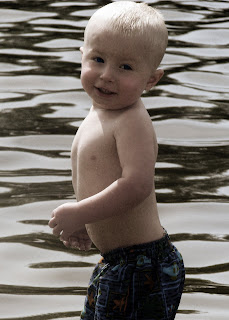
Here is one that I had done on my own, prior.....which I think turned out much better than the one above:
This was quite more involved than the previous two classes. I really like these options, but they are definitely for specific photos, not just any pick in your album.
Labels:
jessica sprague,
photography,
photoshop
Photoshop Elements Tutorial: Class 2
Class two of my http://www.jessicasprague.com/ Photoshop Elements 7 editing tutorial involved brushes. In essence, this involves creating layers {like a stamp, if you will} that will overlay your pictures.
There are thousands of brush types out there available for download {some free, some for purchase}. The class came with some samples, so that's what I used. I am definitely going to do some searching for free brushes to add to my collection.
So, here is my original photograph:
And here is what it looks like after brushing it:

It's really quite a simple change to the picture, but I can't wait to dive into some more complex brushing and see what fun things I can do with my pictures.
Labels:
jessica sprague,
photography,
photoshop
Photoshop Elements Tutorial: Class 1
As I mentioned, I am taking an online {free} course from http://www.jessicasprague.com/ on some basic photo editing using Photoshop Elements 7. I acquired this amazing program through one of my good friends and I am so excited to learn how to do some neat tricks. It's pretty overwhelming to dive into a program this complex, coming from a basic program I have been using {Google Picasa}.
So the first class was showing us how to use frames and word art, which are transparent files, which overlay your picture and add some jazz to your work. I didn't go take any special pictures for this class, so I just pulled some pictures I already had and got to work.
Here is my original photo:
And here is my finished product:
This might have been a better project if I had a girl, since "sassy" was the word art that was provided with the class. But that's ok - now I know how to do it and I can use different word art next time.
Labels:
jessica sprague,
photography,
photoshop
Subscribe to:
Posts (Atom)
